UK:
UK:  USA:
USA:






Managing global tax entity data sounds simple, until you’re dealing until you’re dealing with inconsistent naming conventions, changing records, and the ongoing challenge of keeping VAT Registration Numbers (VRNs) compliant across multiple jurisdictions.
That’s where LimeLyte® Entity Manager quietly does a lot more behind the scenes than most people realise.
Here are three features you might not have known about.
1. It doesn’t just flag name mismatches – it explains them
When you upload your master data into LimeLyte® Entity Manager, the platform checks the entity name you provided against the name returned directly from the relevant tax authority.
But it doesn’t stop at simply saying “match” or “mismatch.”
LimeLyte® Entity Manager applies a confidence score to the comparison and provides context around why a mismatch may have occurred.
For example, in the UK it’s common to abbreviate “Limited” to “Ltd”. So if the tax authority returns:
Innovate Tax Limited
and your uploaded data says:
Innovate Tax Ltd
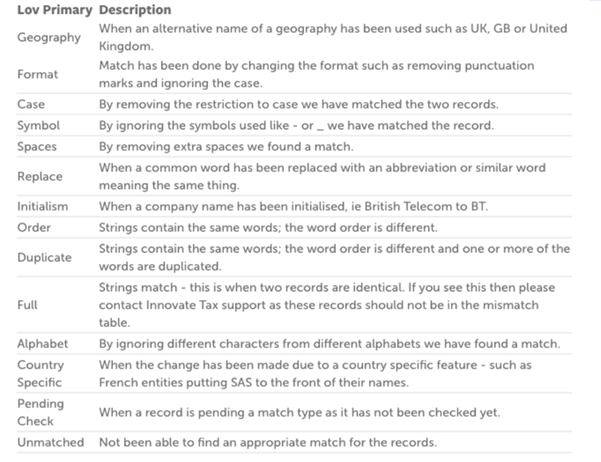
LimeLyte® Entity Manager recognises this as a country-specific naming variation rather than a genuine error.
This becomes even more valuable when managing multinational entities, where abbreviations, punctuation, local language rules, and legal entity structures vary significantly between countries.
Instead of forcing tax teams to manually investigate every discrepancy, LimeLyte® Entity Manager helps users quickly understand whether something is a genuine compliance concern or simply a formatting difference.
Other abilities for the name mismatch are below:
2. Every change is captured in a full historical audit trail
Entity data changes over time and keeping track of those changes is critical for governance and compliance.
Every time data is uploaded or amended in LimeLyte® Entity Manager, the platform records the changes against that entity record.
That means your team can see:
- What changed
- When it changed
- Who changed it
- What the previous value was
For example, if an entity name was initially entered incorrectly, your tax team can later update the record after verification with the tax authority. LimeLyte® Entity Manager then preserves the entire history of that correction, as you can see in the screenshot below.
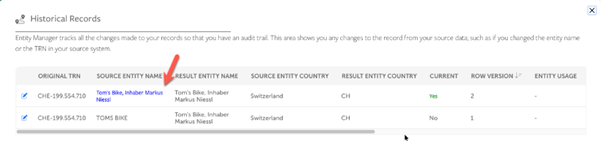
This creates a transparent audit trail that helps teams maintain data integrity, support internal controls and demonstrate governance during audits.
Rather than overwriting information with no visibility, the platform gives organisations a clear historical record of how entity data has changed over time.
3. VAT numbers are continuously re-checked to help you keep compliant
VRNs aren’t something you can validate once and forget about.
Statuses can change, registrations can become invalid, and maintaining compliance requires regular monitoring.
That’s why LimeLyte® Entity Manager automatically re-checks VRNs every 90 days as standard. However, this schedule is fully flexible depending on your business requirements.
Need monthly verification for month-end processes? LimeLyte® Entity Manager can be configured to check every 30 days instead.
This means your team can move into reporting periods with greater confidence that:
- VAT numbers remain valid
- Entity records are up to date
- Compliance risks are reduced
- Issues are identified before they become problems
It’s a simple feature, but one that can save significant time and reduce operational risk for tax teams managing large volumes of global entities.
Interested to know more?
The most valuable compliance tools are often the ones working quietly in the background.
From intelligent mismatch explanations to full audit histories and ongoing VRNVAT Registration Number identifies a taxable business or non-taxable legal entity that is registered for VAT. verification, LimeLyte® Entity Manager is designed to help tax teams maintain cleaner data, stronger governance, and greater confidence in their compliance processes.
And in a world of increasingly complex global tax requirements, those small details make a big difference.
If you’d like to book a demo of the platform, click here.