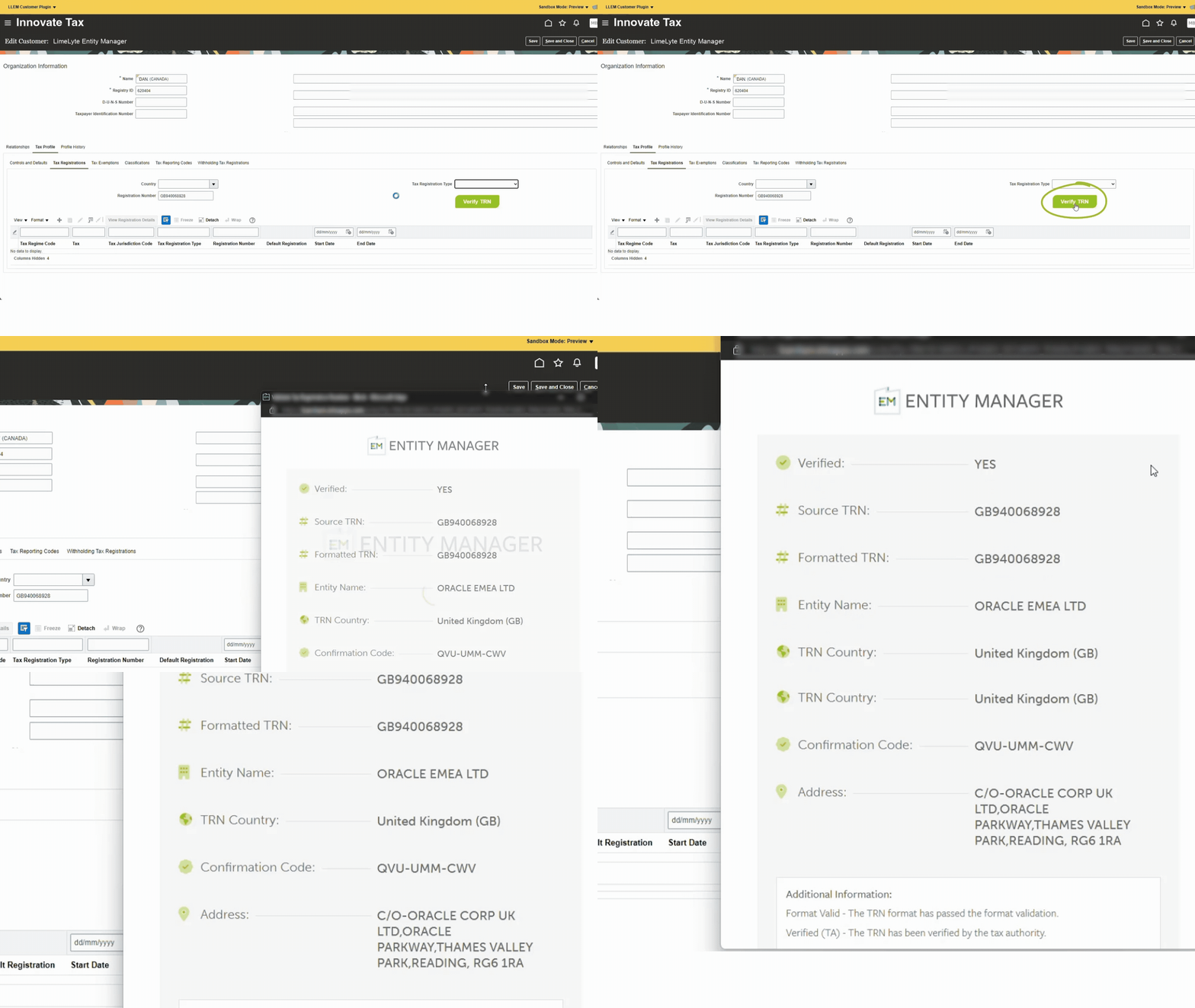
Validate and verify your VAT/GST Numbers in a single click, all within Oracle, SAP or any other global ERP. Our LimeLyte® Entity Manager plugin brings the very best of the full Entity Manager platform to your fingertips by enabling instant VAT Number checks and master data visibility.
Simplify VAT Number verification with our LimeLyte® Entity Manager Plugin
From onboarding a single new customer to maintaining an extensive supplier base across multiple countries, verifying VAT Numbers is essential, but it shouldn’t be slow and complex. We understand the pain of juggling manual checks, switching between systems, and missing a clear audit trail when it matters most.
That’s why we created the LimeLyte® Entity Manager Verification Plugin.
Our plugin brings instant Tax Registration Number (TRNWe use TRN for Tax Registration Number instead of VRN (VAT Registration Number) or GRN (GST Registration Number) because there is more than one indirect tax type out there and we cover them all. So whether you only need to check VAT numbers, have Japanese Consumption tax or Indian GST, don't worry, when you see TRN, it all means the same thing.) verification directly into your Oracle Cloud or other ERPEnterprise resource planning (ERP) is a type of software that organisations use to manage main business processes. screen. And when we say TRN, that’s our catch-all term covering VAT, GSTGoods and Services Tax, and Consumption Tax Numbers.
No more extra logins, no more hopping between tabs; simply click the ‘Verify’ button and get real-time confirmation complete with entity details, country code, and a compliance-ready reference.
Traditional VAT Number verification is slow, manual, and fragmented, but the Plugin streamlines the process by integrating it directly into your ERP for instant, on-page checks.
Verify in 3 simple steps
No extra logins, no switching between systems.
1. Enter VAT Details
Start by opening the relevant Customer Tax Profile or Supplier Tax Details page in your ERP. Type in the VAT or GST Number, you can include the country code or enter the numeric portion, as the plugin will automatically detect it.
2. Click ‘Verify’
Select the ‘Verify TRN’ button to instantly open the plugin’s validation pop-up. Within seconds, the system checks the TRN (Tax Registration Number) against the appropriate tax authority and retrieves the registered details for review.
3. Check and continue
The pop-up displays a pass/fail result along with the validated company details, confirmation code and any reason for an invalid status.
Once you have checked the result, simply close the window as there’s no need to save the confirmation code yourself, because we’ve already done it for you.
Do you struggle with VAT Number verification?
Keeping your VAT Numbers accurate and compliant can be harder than it should be. Many organisations face common roadblocks, such as:
Uploading historical records into a separate audit tool
Relying on manual checks at the point of entry
Logging into multiple portals to confirm details
Constantly switching between screens and tabs
Having no integrated audit trail
Being unable to run bulk checks efficiently
The LimeLyte® Entity Manager Plugin removes these frustrations by putting the verification process exactly where you work — inside your ERP — with everything accessible at the click of a button.
Key features
What does the LimeLyte® Entity Manager Plugin do?
Use the ‘Verify’ button from Customer Tax Profile or Supplier Tax Details in any ERP
Stay on the page you’re working on — no extra portals, no context switching.
Trigger checks exactly where users create or update entities, reducing time and data-entry errors while keeping teams in flow.
Real-time verification with the tax authority
Immediate pass/fail feedback at point of entry.
Results return in seconds so users can resolve issues before saving records or issuing documents.
Audit-ready confirmation codes
Every successful check generates a reference for compliance.
Store confirmation numbers alongside entity data to evidence due diligence during audits.
Automatic country-code detection & formatting
Enter with or without country codes — we normalise it.
Reduce data-quality issues with consistent ISO country codes and formatted VAT Numbers.
Duplicate VAT Number prevention
Avoid accidental re-use across customers or suppliers.
Get notified if a VAT Number already exists in your system to keep master data clean.
Clear error guidance
Know exactly why a VAT Number failed and what to fix.
Contextual messages help users correct format issues or try again when authority data is unavailable.
Resilient when APIs are unavailable
Check plugin history and re-validate later.
Maintain continuity during authority outages; your previous check context is still available.
Reduce name/country mismatches
Return registered entity details from the authority.
Match the authoritative entity name and issuing country to what’s stored in your records.
Customer & supplier regime-level checks
Validate defaults and regime rows consistently.
Support both default and regime-level VAT Numbers so your master data stays accurate across jurisdictions.
Plugin Demo
Interested in booking a demo?
Simply fill out the form and tell us the best time for you
"*" indicates required fields
Why Switch?
Compare your workflow
While the Plugin has the ability to transform VAT number verification for businesses used to completing manual checks via tax authority portals, we understand there are some tax teams that require even more functionality at their fingertips.
That’s where the full LimeLyte® Entity Manager platform comes in with its Audit feature. The full version is specially designed for companies that need deep visibility, bulk controls and audit evidence on demand.
Take a look below to compare the performance of the three options available to you:
Feature
Manual
LLEM Plugin
Entity Manager
Real-time VAT Number checks
✓
✓
✓
ERP-embedded ‘Verify’ button
×
✓
✓
Confirmation codes for audit
×
✓
✓
Automatic country-code detection & formatting
×
✓
✓
Duplicate VAT Number prevention
×
✓
✓
Clear error guidance
×
✓
✓
Bulk VAT Number verification
×
×
✓
Detailed audit trail & reporting
×
×
✓
Continuous automation of VAT Number checking
×
×
✓
Unique algorithm for name mismatch checking
×
×
✓
Historical record uploads
×
×
✓
Advanced matching & duplicate resolution
×
×
✓
Want the plugin and more? Introducing the full LimeLyte® Entity Manager platform
Of course, some businesses need to go beyond the quick checks. If you’re handling large volumes of supplier or customer records, you may need the full LimeLyte® Entity Manager platform.
The full solution offers all the functionality of the plugin and much more, helping your business to:
Save time, reduce costs and increase accuracy by automating VRN validation
Your team will only be required to act on red flags highlighted on your dashboard, freeing them to focus on more important projects
Eliminate paper trails and reduce human inputs by 99% by relying on automation
Improve the quality and clarity of master data, boosting compliance and protecting against audit
Ensure every tax invoice you file is populated with accurate, valid VRNs and other key data
Want to see what we’re up to all year round? Sign up for our newsletter to keep up with all our news and updates.
Updates
News
Solutions
Manage Consent
To provide the best experiences, we use technologies like cookies to store and/or access device information. Consenting to these technologies will allow us to process data such as browsing behaviour or unique IDs on this site. Not consenting or withdrawing consent, may adversely affect certain features and functions.
Functional
Always active
The technical storage or access is strictly necessary for the legitimate purpose of enabling the use of a specific service explicitly requested by the subscriber or user, or for the sole purpose of carrying out the transmission of a communication over an electronic communications network.
Preferences
The technical storage or access is necessary for the legitimate purpose of storing preferences that are not requested by the subscriber or user.
Statistics
The technical storage or access that is used exclusively for statistical purposes.The technical storage or access that is used exclusively for anonymous statistical purposes. Without a subpoena, voluntary compliance on the part of your Internet Service Provider, or additional records from a third party, information stored or retrieved for this purpose alone cannot usually be used to identify you.
Marketing
The technical storage or access is required to create user profiles to send advertising, or to track the user on a website or across several websites for similar marketing purposes.
Our e-invoicing services are designed to propel tax, IT, compliance and wider finance teams towards seamless adherence to all global e-invoicing mandates. Find out more about how Innovate can help to prepare and perfect your e-invoicing setup.
Download inFlyte US Overview
Powered by INTX US Rates Content, the inFlyte™ US extension is designed specifically for Oracle ERP systems, offering seamless automation of tax compliance. Find out more.
 UK:
UK:  USA:
USA: